Here we are comparing Lenovo Thinkpad X1 Carbon Gen 7 and Lenovo Thinkpad X1 Carbon Gen 6. What you thnk which one is better successor vs predecessor.
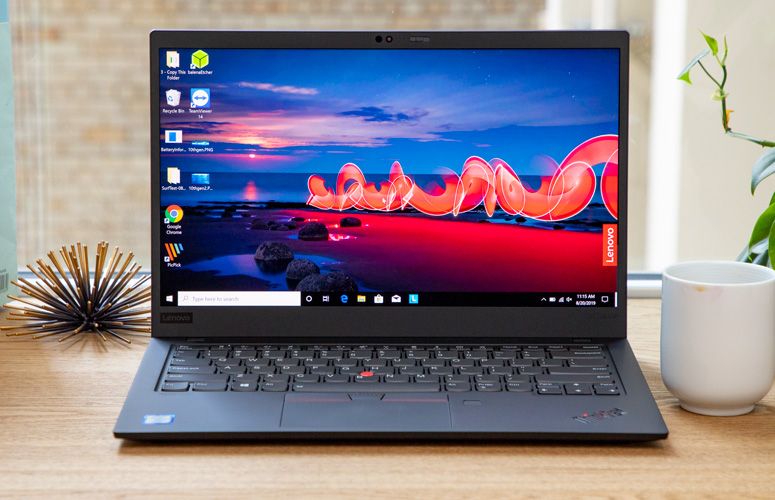
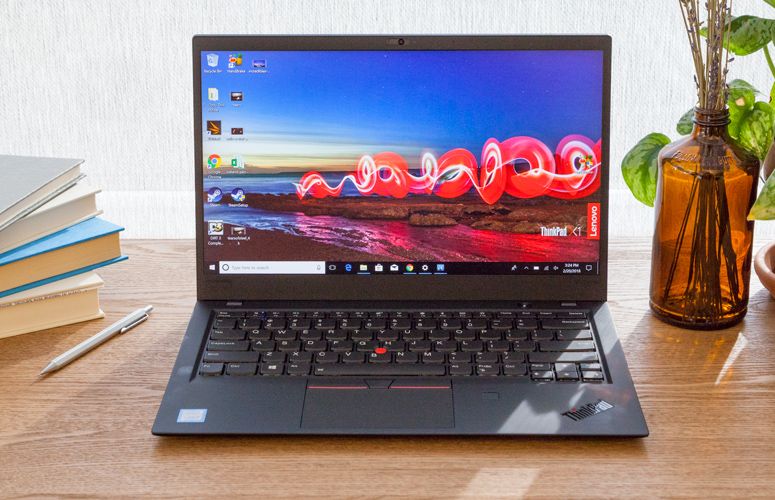
Technical Specification
| Model | Thinkpad X1 Carbon Gen 7 | Thinkpad X1 Carbon Gen 6 |
| Processor | ||
| 8th Generation Intel® Core™ i7-8565U (1.80GHz, up to 4.60GHz with Turbo Boost, 4 Cores, 8MB Cache) | Up to 8th Generation Intel® Core™ i5-8350U with vPro™ (1.70GHz, up to 3.60GHz with Turbo Boost, 6MB Cache) | |
| 8th Generation Intel® Core™ i7-8665U with vPro™ (1.90GHz, up to 4.80GHz with Turbo Boost, 4 Cores, 8MB Cache) | Up to 8th Generation Intel® Core™ i7-8650U with vPro™ (1.90GHz, up to 4.20GHz with Turbo Boost, 8MB Cache) | |
| 10th Generation Intel® Core™ i5-10210U (1.60GHz, up to 4.20GHz with Turbo Boost, 4 Cores, 6MB Cache) | ||
| 10th Generation Intel® Core™ i7-10510U (1.80GHz, up to 4.90GHz with Turbo Boost, 4 Cores, 8MB Cache) | ||
| 10th Generation Intel® Core™ i7-10710U (1.10GHz, up to 4.70GHz with Turbo Boost, 6 Cores, 12MB Cache) | ||
| 8th Generation Intel® Core™ i5-8265U (1.60GHz, up to 3.90GHz with Turbo Boost, 4 Cores, 6MB Cache) | ||
| Operating System | Thinkpad X1 Carbon Gen 7 | Thinkpad X1 Carbon Gen 6 |
| Windows 10 Home | Windows 10 Home | |
| Windows 10 Pro | Windows 10 Pro | |
| Display | Thinkpad X1 Carbon Gen 7 | Thinkpad X1 Carbon Gen 6 |
| 14″ WQHD (2560 x 1440) IPS, anti-glare, 300 nits | 14″ FHD (1920 x 1080) IPS, anti-glare, 300 nits | |
| 14″ FHD (1920 x 1080) IPS, low power, anti-glare, 400 nits | 14″ FHD (1920 x 1080) IPS, anti-glare, touchscreen, 300 nits | |
| 14″ FHD (1920 x 1080) IPS, PrivacyGuard, anti-glare, 400 nits | 14″ WQHD (2560 x 1440) IPS, anti-glare, 300 nits | |
| 14″ FHD (1920 x 1080) IPS, anti-glare, touchscreen, 300 nits | 14″ HDR WQHD (2560 x 1440) IPS, glossy with Dolby Vision, 500 nits | |
| 14″ UHD (3840 x 2160) IPS, glossy, dolby vision™ HDR 400, 500 nits | ||
| Memory | Thinkpad X1 Carbon Gen 7 | Thinkpad X1 Carbon Gen 6 |
| Up to 16GB LPDDR3 2133MHz | Up to 16GB LPDDR3 2133 MHz (Soldered) | |
| Battery | Thinkpad X1 Carbon Gen 7 | Thinkpad X1 Carbon Gen 6 |
| Up to 18.3 hours* on 51Whr, includes Rapid Charge technology† | Integrated 3 cell Li-Ion 57Wh with RapidCharge technology | |
| Up to 15 hours of battery life* | ||
| Storage | Thinkpad X1 Carbon Gen 7 | Thinkpad X1 Carbon Gen 6 |
| Up to 1TB SSC PCIe | Up to 1TB SSD PCIe | |
| Graphics | Thinkpad X1 Carbon Gen 7 | Thinkpad X1 Carbon Gen 6 |
| Up to Integrated Intel® UHD 620 Graphics | Integrated Intel® UHD Graphics 620 | |
| Security | Thinkpad X1 Carbon Gen 7 | Thinkpad X1 Carbon Gen 6 |
| Fast Identity Online (FIDO) authentication capabilities | Fast Identity Online (FIDO) authentication capabilities | |
| Match-on-Chip Fingerprint Reader | dTPM 2.0 | |
| dTPM 2.0 chip | Match-on-chip touch fingerprint reader | |
| ThinkShutter camera cover | Windows Hello with facial recognition software (requires IR camera) | |
| Optional: ThinkPad PrivacyGuard | ThinkShutter | |
| Optional: ThinkPad PrivacyAlert* | Kensington® lock slot | |
| Optional IR Camera | ||
| Kensington lock slot | ||
| Audio | Thinkpad X1 Carbon Gen 7 | Thinkpad X1 Carbon Gen 6 |
| Dolby Atmos™ Speaker System | Noise-cancelling dual-array far field microphones | |
| 4 x 360-degree far-field microphones | Dolby Audio™ Premium | |
| Dolby Atmos® for headphones | ||
| Camera | Thinkpad X1 Carbon Gen 7 | Thinkpad X1 Carbon Gen 6 |
| 720p HD Camera with microphone | HD 720p with ThinkShutter and microphone | |
| IR & 720p HD Camera with microphone | Optional: IR camera – required for facial recognition. ThinkShutter is not available on configurations with the IR Camera. | |
| Dimensions (H x W x D) | Thinkpad X1 Carbon Gen 7 | Thinkpad X1 Carbon Gen 6 |
| 12.71″ x 8.54″ x 0.58″ / 323 x 217 x 14.95 (mm) | 12.73″ x 8.54″ x 0.62″ / 323.5 x 217.1 x 15.95 (mm) | |
| Weight | Thinkpad X1 Carbon Gen 7 | Thinkpad X1 Carbon Gen 6 |
| Starting at 2.40 lbs (1.08 kg) | Starting at 2.49 lbs (1.13 kg) | |
| Color | Thinkpad X1 Carbon Gen 7 | Thinkpad X1 Carbon Gen 6 |
| Black | Black with color coded hinges | |
| Connectivity | Thinkpad X1 Carbon Gen 7 | Thinkpad X1 Carbon Gen 6 |
| Network extension for Ethernet/side mechanical docking | Intel® Dual-Band 8265 Wireless AC (2 x 2) + Bluetooth® 4.1 with vPro™ | |
| WLAN: Intel® Dual-Band 9560 802.11 AC (2 x 2) | ||
| Bluetooth® 5.0 | ||
| Optional WWAN: Fibocom L850-GL 4G LTE CAT9 | ||
| Ports | Thinkpad X1 Carbon Gen 7 | Thinkpad X1 Carbon Gen 6 |
| 2 x USB 3.1 (Gen 2) Type-C / Intel Thunderbolt™ 3 (DisplayPort, Data transfer) | 2 x USB 3.1 Gen 1** (one Always On) | |
| 2 x USB 3.1 (Gen 1)** (1 always on) | 2 x USB 3.1 Gen 2 Type-C / Intel Thunderbolt 3 (Power Delivery, DisplayPort, Data transfer) | |
| HDMI 1.4 | HDMI | |
| Network extension for Ethernet/side mechanical docking | Headphone / microphone combo jack | |
| Headphone / mic combo | MicroSD card reader | |
| Optional: WWAN slot | Ethernet Extension Connector (Dongle for Native Ethernet sold separately) | |
| Keyboard | Thinkpad X1 Carbon Gen 7 | Thinkpad X1 Carbon Gen 6 |
| Spill resistant | Spill resistant | |
| Backlit with white LED lighting | English backlit | |
| French backlit | ||
| Supported Docking | Thinkpad X1 Carbon Gen 7 | Thinkpad X1 Carbon Gen 6 |
| ThinkPad Thunderbolt™ 3 Dock | ||
| USB 3.0 Dock | ||
| ThinkPad 90W Basic Dock | ||
| ThinkPad 90W Pro Dock | ||
| ThinkPad 90W Ultra Dock | ||
| What’s in the box | Thinkpad X1 Carbon Gen 7 | Thinkpad X1 Carbon Gen 6 |
| ThinkPad X1 Carbon Gen 7 | ThinkPad X1 Carbon (6th Gen) | |
| 65W AC adapter | 65W Type-C Power Adapter | |
| 4 cell, 80Wh internal battery | Quick Start Guide | |
| Quick start guide | 1 Year Depot Base Warranty: Protects internal hardware only and requires mail-in repair | |
| Based on testing with MobileMark 2014. Battery life varies significantly with settings, usage, and other factors. |